
A growing trend among teens, and adults alike, is the sideloading of mobile device apps via 3rd party app stores such as TutuApp, Aptoide and several others (there are ~300+ 3rd party app stores worldwide and growing, according to an article by Wandera). These app stores are attracting people through promises of free and enhanced (hacked) versions of popular games, unlimited video & music streaming capabilities, feature-rich messaging apps and more.
What are sideloaded apps?
Sideloaded apps, on mobile devices (phones, tablets etc.), are simply apps that have been installed outside of the official App Store for your device operating system (ex. Apple App Store for iOS, Google Play for Android).
In the past, you may have heard of untrusted apps being installed on mobile phones that were either rooted (Android) or jailbroken (iOS) thus bypassing built-in protections. However, 3rd party apps stores are now using the same tools that are more commonly used by corporate IT departments to manage or deploy custom apps to employees (Mobile Device Management or MDM). Not only that, but these apps are also being installed in a way that is bypassing most of today’s parental controls (ex. Apple’s ask before you buy) on mobile devices without the need for modifying the operating system (i.e. root/jailbreak).
How is this happening?
On iOS iPhones, for example, a user is typically directed to a website which prompts for permission to install a MDM configuration profile to enroll the device. The user will then be instructed to “trust” the app provider/developer by going to Settings >> General >> Profiles & Device Management. At this point, the user can install apps from this 3rd party app store while bypassing your Apple App Store parental controls.
Keep in mind that there are 2 steps above where the device owner had to choose to accept and trust the installation process. That said, I think we’d all agree that there seems to be endless ways in which our mobile phones can be attacked, but this should serve as a reminder that the most common way for a device to be compromised is through careless actions of device owners.
It’s also worth noting that Android devices use this method less often since sideloading untrusted apps on an Android can be done by simply installing an APK file downloaded from a website. This does, however, require the user to enable or “allow” the installation of “unknown sources” in the devices security settings.
What’s the risk?
Mainstream app stores (e.g. Apple App Store) typically have a rigorous security vetting process for apps, helping to avoid malicious apps from being published. Once you trust and allow sideloaded apps from untrusted app stores, you’re opening yourself up to the very real threats of untrusted apps on your device. For example, a malicious version of what seems to be a legitimate app can trick users into exposing passwords, contact, photos, messages, or other more personal data.
Also, sideloaded apps such as browsers, movie players, messaging apps, etc. could bypass your age-restriction controls leaving your children exposed to a world of explicit content, online predators, inappropriate websites, etc.
Recommendations to Parents
For iPhones, follow the steps below to check whether your child’s phone has additional MDM or configuration profiles installed:
1. Check your child’s device for Configuration Profiles and Apps. If so, remove them.
- Look for any MDM profiles in: Settings > General > Profiles & Device Management > [MDM configuration] > Restrictions
- Check for which (if any) applications a MDM profile installed on the device in: Settings > General > Profiles & Device Management > [MDM configuration] > Apps.
Note: If you do not have any PROFILE & DEVICE MANAGEMENT menu option available, this means the phone is currently not enrolled in an MDM, nor are there any additional profiles trusted on the phone.
2. You may also want to consider changing any passwords that may have been used in conjunction with apps deployed via untrusted app stores, as a precaution.
Also, if you use Apple’s Screen Time restrictions, you can watch for app usage where the icons (to the left) appear blank (see below for an example). Missing app icons or unknown app names should be a clear indicator that something is not right.
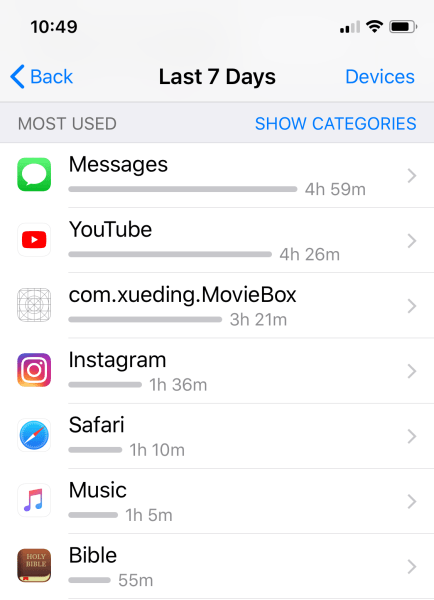
Figure 1:
See Figure 1 depicting [com.xueding.MovieBox] as an example of a sideloaded app that shows up with a blank/unknown icon in Apple’s iOS Screen Time reports.
Reference articles and resources:
Below are a few supporting articles including research on malicious activity using similar techniques.
https://blogs.cisco.com/security/talos/malicious-mdm-lets-hide-this-app
https://blog.talosintelligence.com/2018/07/Mobile-Malware-Campaign-uses-Malicious-MDM.html
https://digitalguardian.com/blog/mobile-attack-campaign-used-mdm-intercept-traffic
 MARK SCALIA